FAQ
Sign In Contact Sales
  1. Home
  2. Solutions
  3. Clinics & Hospitals

Solutions • Clinics & Hospitals

Waiting rooms that answer before anyone asks

Opening hours, which floor each department is on, what to bring to an appointment. Put it on the screens once, and the front desk stops answering the same questions all day.

Contact Sales All solutions
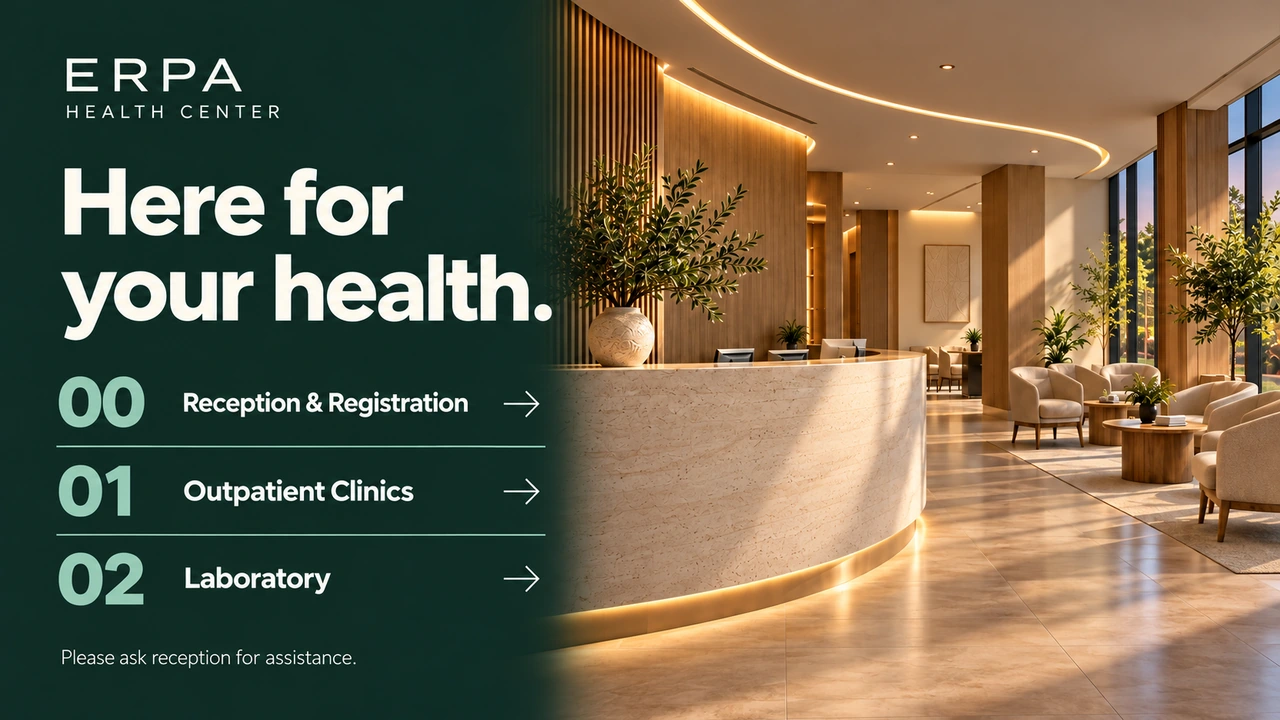
Erpa Health Center lobby screen: "Here for your health." with numbered directions to Reception & Registration, Outpatient Clinics and the Laboratory, beside a photo of a warm, wood-lined reception hall.

A day in the waiting room

The same screens guide, inform and reassure, hour by hour.

  • Opening in the morning

    Which clinics are open today and on which floor, on screen before the first patient arrives.

  • While patients wait

    Short, calm health information in place of a muted TV channel.

  • A doctor is away

    Change today's notice from your phone; every screen in the building shows it within seconds.

  • A seasonal campaign

    Flu jabs or a screening month on a set date range, ending on its own.

  • Visiting hours

    Visiting times and rules for each ward, where visitors come in.

  • At the pharmacy

    Seasonal products and health advice beside the counter.

Keeping patients informed, then and now

Printed notices and a TV With Jonza
  • Printed notices and a TV:Notices taped to the wall go out of date

    With Jonza:Change a notice once and every building shows it

  • Printed notices and a TV:The front desk answers the same questions all day

    With Jonza:Directions and opening hours on screen all day

  • Printed notices and a TV:Each department makes its own posters

    With Jonza:One look for every department, from one account

  • Printed notices and a TV:A TV channel nobody chose plays in the waiting room

    With Jonza:Calm, useful content you choose, on a schedule

Every part of the building

Each area has its own visitors and its own questions.

  • Entrance and reception

    The way to each department, and what to do first.

    • Directions
    • Opening hours
    • Check-in steps
  • Waiting rooms

    Information that makes the wait feel shorter.

    • Health tips
    • Services
    • Clinic news
  • Corridors and lifts

    Which floor is which, at the moment people need it.

    • Floor guides
    • Department lists
  • Wards

    Visiting hours and the rules for visitors.

    • Visiting hours
    • Ward rules
  • The pharmacy

    Seasonal products and advice beside the counter.

    • Seasonal products
    • Health advice
  • Staff areas

    Shift notes, trainings and internal announcements.

    • Internal announcements
    • Trainings
    • Rotas

The right notice in every building

Tag screens by building, floor or department. Send a notice to all of them, or only to the ones it concerns, and see which screens are online.

  • Tag screens by building and department
  • Send to every screen, or to one group
  • See which screens are online and what they're playing

Plan the week, and the season

Morning and afternoon clinics, weekend opening hours, a vaccination campaign with an end date. Put them on a weekly calendar and the screens follow it.

  • Weekday and weekend plans
  • Campaigns with a start and an end date
  • A higher priority for an urgent notice

Planning screens for your clinic or hospital?

Tell us how many buildings and screens you have, and we'll come back with a plan and a quote.

Get a Quote

From the first screen to the whole building

  1. 01

    Turn the screen on

    Use a Tochi screen we send you with Jonza ready, or one you already have; our team can set it up remotely.

  2. 02

    Pair and tag it

    Enter the six-digit code the screen shows into the dashboard, then tag it with its building and floor.

  3. 03

    Add notices and a plan

    Upload your images and videos, build a playlist for each area and put them on the weekly calendar.

Questions clinics and hospitals ask

Will patient information appear on the screens?

No. Screens show only the content you add to a playlist. Jonza isn't connected to your patient records, so no personal health data reaches the screens.

Can each department show something different?

Yes. Tag screens by department and give each group its own playlist, while notices for everyone go to every screen at once.

How fast can we put out an urgent notice?

Within seconds. Publish it with a higher priority than the regular content and every connected screen you've chosen picks it up on its own.

Can we use the screens we already have?

Often, yes. The Jonza player runs on Linux, Windows, Android, Google TV, Amazon Fire TV, LG webOS, Raspberry Pi and Samsung Tizen, and our team can connect to existing screens remotely and set them up. We can also ship Tochi screens, our own brand made in Türkiye, with Jonza already set up.

How much does it cost?

It depends on how many screens and buildings you run. Write to us with your setup and we'll put together a plan.

What is digital signage for healthcare?

Screens in waiting rooms, corridors and pharmacies that guide patients and visitors, share health information and carry notices. Because it's managed online, every building and department can be updated from one place.

Read next

  • Blog Screens in Clinic Waiting Rooms What to show in clinic and pharmacy waiting areas, what to keep off the screen, and how to keep it calm. Read more
  • Blog Privacy Basics for Screens Names on screens, staff photos, cameras and QR codes: the privacy questions to ask before content goes up. Read more
  • Features Device Management Live status for every screen, tags for branches and floors, and remote settings without a site visit. Read more

Ready to put your screens to work?

Leave your details and we'll get back to you with a quote. From setup to the first thing on screen, our team is with you.

info@jonza.app

We use your details only to answer your request, as set out in our Privacy Policy.

Thank You

Your request has reached us. Our team will be in touch shortly.

The simple way to manage digital signage. Jonza is built in Türkiye by Erpa Teknoloji, with a long track record in digital displays and industrial solutions.

Solutions

  • Cafés & Restaurants
  • Retail
  • Municipalities
  • Offices & Lobbies
  • Clinics & Hospitals
  • Hotels
  • Jewellery & Boutiques
  • Gyms & Studios

Features

  • Screen Designer
  • Playlists
  • Scheduling
  • Device Management
  • Media Library
  • Widgets
  • Supported Devices

Resources

  • Blog
  • Guides
  • Compare
  • USB Stick vs Jonza
  • Printed vs Digital Menu Boards
  • Best Digital Signage Software Companies

Jonza

  • Features
  • References
  • FAQ
  • Press Kit
  • Contact
  • Sign In
  • Privacy Policy
  • Cookie Policy
© 2026 Jonza. All rights reserved. info@jonza.app EN TR Made in Türkiye · A product of Erpa Teknoloji