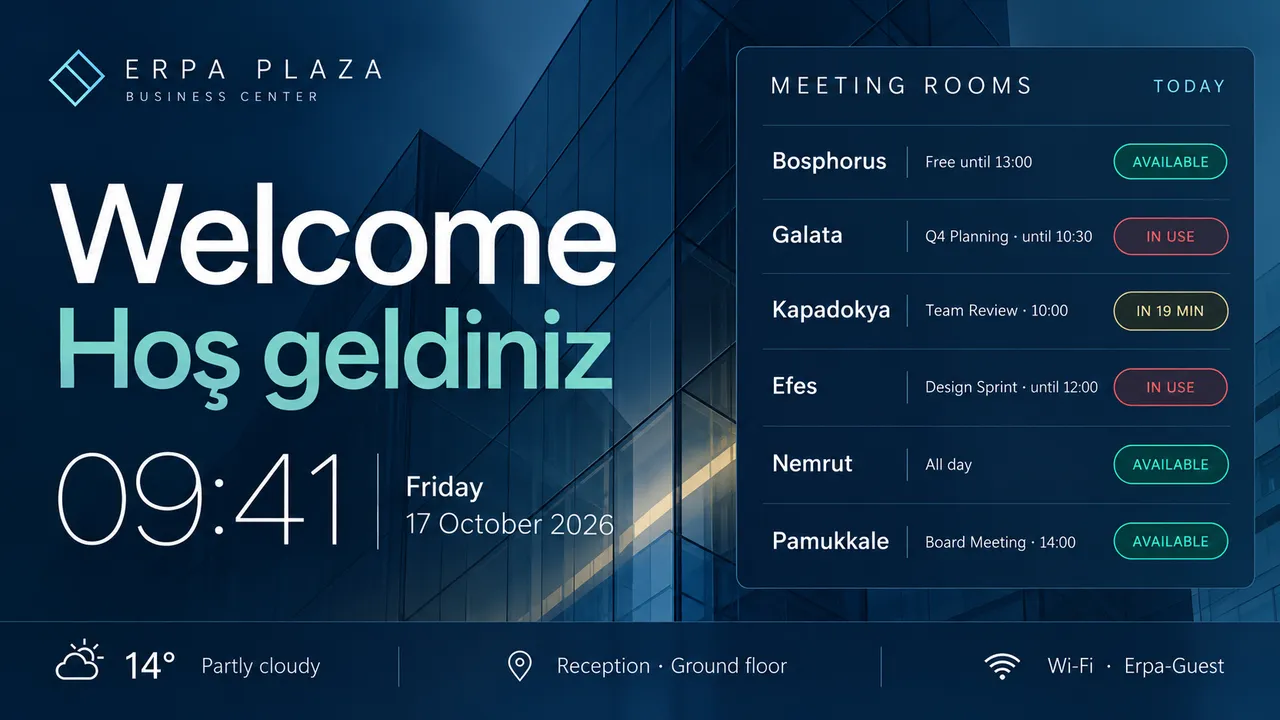
Greet today's guests in a text widget, in both languages if you like, with your logo and the reception floor.
Rooms and events
List today's meetings and events on the screen, or show a web page you already keep up to date.
Clock in any time zone
The local time and date, or a row of clocks for offices abroad. Seconds on or off.
Company announcements
Results, new starters, an all-hands reminder. Schedule them for the week they matter and they come down by themselves.
A screen on every floor
Tag screens by floor or building and give each its own content, or send one announcement to all of them.
Keeping the lobby up to date
A TV and a USB stickWith Jonza
A TV and a USB stick:Someone from IT walks down to swap the file
With Jonza:Change the welcome from your desk, in seconds
A TV and a USB stick:The welcome slide still names last week's guest
With Jonza:Announcements run on the dates you set
A TV and a USB stick:Announcements stay up long after they matter
With Jonza:See every screen's status without leaving your floor
Every floor of the building
From the front door to the kitchen, each screen has its own audience.
Reception
The first thing a visitor sees: a welcome, the time and the way to their meeting.
Visitor welcome
Directions
Company story
Lifts and corridors
A few seconds of attention, used well: one announcement at a time.
Announcements
Events
Reminders
Meeting floors
Today's events and trainings, and which room each one is in.
Event schedule
Trainings
Directions
The kitchen and break room
The informal screen: birthdays, new joiners, the week's menu.
Company news
Celebrations
Canteen menu
Production and warehouse
Safety notices and shift information, where the work happens.
Safety rules
Shift plans
Production targets
Build the lobby screen from widgets
Lay a background image, a welcome line, a clock and a web page on one screen, each in its own layer. Move and style each piece, and preview the result before it goes live.
Clock, text, ticker, image and website widgets
Fonts, sizes and colours to match your brand
Landscape and portrait screens
Every screen in the building, at a glance
See which screens are online and what they're playing, floor by floor. Adjust brightness and rotation remotely, and update a whole group at once.
Planning screens for your building?
Tell us how many floors and screens you have, and we'll come back with a suggested setup and a quote.
Turn it on and type the six-digit code it shows into the dashboard. Name it "Lobby".
02
Design the welcome
Add your background, a welcome line, a clock and whatever else the lobby needs.
03
Plan the week
Put announcements on the calendar so each one runs only for the days it matters.
Questions office managers ask
Does our IT team need to install anything?
No. Jonza runs in the browser, so there's nothing to install on your computers. Screens are paired with a six-digit code, and our team can set up existing screens remotely.
Can we show a page from our intranet or another system?
The website widget shows any web page live on screen and reloads it on an interval you set. The screen needs to be able to reach that address.
How is our account protected?
You can turn on two-step verification with any authenticator app, see every device signed in to your account, and sign any of them out remotely.
Can each floor show something different?
Yes. Tag screens by floor or building and give each group its own playlist and schedule.
Can we show a welcome for a particular visitor?
Yes. Edit the welcome before they arrive, or plan it for the hours of their visit, and the screen changes back on its own afterwards.
What is corporate digital signage?
Screens in a company's lobby, corridors and shared spaces that welcome visitors and keep staff informed. Because they're managed online, every floor and every office can be updated from one place.